Tuesday, December 25, 2007

WCF Message Size Tester

Recently on the WCF Forum someone suggested that WCF wasn't able to send messages larger than 2 GB, so I wrote up a little example to disprove this theory.  I was able to send a 500 GB message with no problems, and I'm guessing that if I let it run long enough, there will be no problem sending up to 8 million terabytes, the maximum size of a WCF message (Int64.MaxValue).

The main "trick" to sending messages larger than 2 GB is to change the binding's TransferMode from its default of TransferMode.Buffered to TransferMode.Streamed.  Besides enabling you to send messages with minimal in-memory overhead, this also allows you to set MaxReceivedMessageSize larger than 2 GB without WCF throwing an exception when it tries to build the channel stack.

It's worth noting that MaxReceivedMessageSize is enforced by WCF regardless of whether the TransferMode is Buffered or Streamed.  The same is true for SendTimeout and ReceiveTimeout, so these still need to be adjusted accordingly.

Stream-based messaging in WCF is typically accomplished by using service operations that take a Stream as the only parameter, return a Stream, or both.  So what kind of Stream should I ask WCF to send for me?  I wanted my example to run as fast as possible, which means I didn't want it to be touching the disk in order to send or receive messages.  And I don't have enough memory or address space to buffer a 500 GB MemoryStream.  So I created a little hack stream implementation whose Read method leaves the byte buffer untouched and simply returns the appropriate number of bytes "read".  This results in sending 500 GB of zeros. :-)

Download the example code here.

Tuesday, December 11, 2007

Rhino Mocks Quick Reference

Last week I gave a presentation on mock objects for Software Professionals of Alaska.  Once the PowerPointy hand-waving was out of the way, I illustrated the concepts with code examples using Rhino Mocks.  I thought I was well-versed in Rhino Mocks before I started, but in the process of preparing the presentation I realized there was a lot that I didn't know or had forgotten.  So I distilled all the main facts and features down into a 3-page quick reference of tables and example usage.  You might argue that 3 pages makes it a "slow reference," but regardless I still think it's useful to see all the basics stripped down to the bare minimum.  Much of the content came from the Rhino Mocks Documentation Wiki, so look there first if you need more details on a particular feature.

So without further ado, I present the Rhino Mocks 3.3 Quick Reference.  It includes:

  • the 3 different record/replay syntax styles
  • 4 types of mocks, 7 if you include MultiMocks
  • expectations and setup
  • methods
  • properties
  • events
  • exceptions
  • delegates
  • custom behavior
  • assert messages
  • ordered and unordered
  • repetition
  • the full set of argument constraints

Feedback is quite welcome.  Enjoy!

Wednesday, September 26, 2007

Google Street View in Anchorage

Yesterday as Garret and I were on our way to the Software Professionals of Alaska meeting where Dan and I presented on MbUnit, we spotted one of these on 36th Avenue!  So I grabbed my cell phone and snapped a few shots.  Too bad the camera was covered due to the rain, otherwise we might be famous!  The Starbucks-sipping driver frowned at us as we enthusiastically pointed, waved, and took pictures.

Tuesday, December 19, 2006

Generic NHibernate Enum String Mapping

Today one of my coworkers mentioned all the little NHibernate enum mapping turd classes that were accumulating in our data access layer.  See this post for more details on how it works and why you would want to do this.  I wondered aloud if generics could be used to eliminate this waste of disk space.  A few minutes later, this is what we came up with.

public class GenericEnumMapper<TEnum> : EnumStringType
{
public GenericEnumMapper() : base(typeof(TEnum))
{
}
}

To use this class in your NHibernate mapping file, just use the following lovely .NET 2.0 generics syntax in your "type" attribute:

MyNamespaceB.GenericEnumMapper`1[[MyNamespaceA.MyEnum,
MyAssemblyA]], MyAssemblyB

No, that ` is not an apostrophe, it's a backtick.  It lives on the same key as ~ on my keyboard.


Here it is in a sample hbm.xml mapping file:

<?xml version="1.0" encoding="utf-8" ?>
<hibernate-mapping xmlns="urn:nhibernate-mapping-2.0">
<class name="MyNamespaceA.UserCredential, MyAssemblyA"
table="UserCredential" lazy="false">
<id name="Id" column="ID" type="Guid">
<generator class="guid.comb" />
</id>
<property name="UserId" />
<property name="CredentialType" column="CredentialTypeID"
type="MyNamespaceB.GenericEnumMapper`1[[MyNamespaceA.CredentialType,
MyAssemblyA]], MyAssemblyB"
/>
...
</class>
</hibernate-mapping>

Copy, paste, and replace CredentialType with your own enum type, and you're good to go!

Thursday, October 26, 2006

Debugging with Reflector and Visual Studio

Mike Taulty recently posted about how he debugs using Visual Studio, Reflector, and SOS. I've been doing a similar style of debugging lately that I think is a bit more efficient, and here's how I do it. You may want to first take a look at what Mike's doing to put this in context.

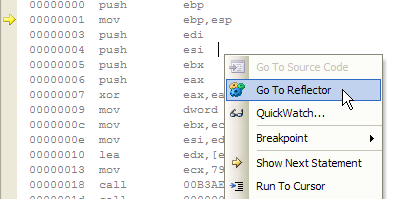
First I use Jamie Cansdale's awesome TestDriven.NET which has the very cool Go To Reflector feature.

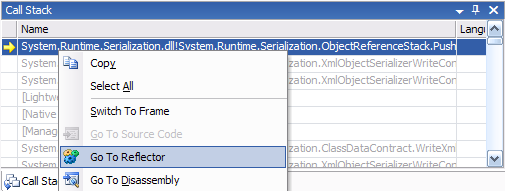
You can also Go To Reflector from any frame in a call stack:

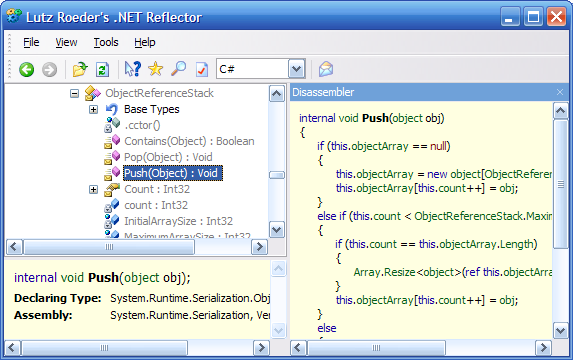
One cool thing about this is that your Reflector instance stays open the whole time, and as you bounce around your call stack using Go To Reflector, the Reflector instance synchronizes to the new location that you specified using Go To Reflector.

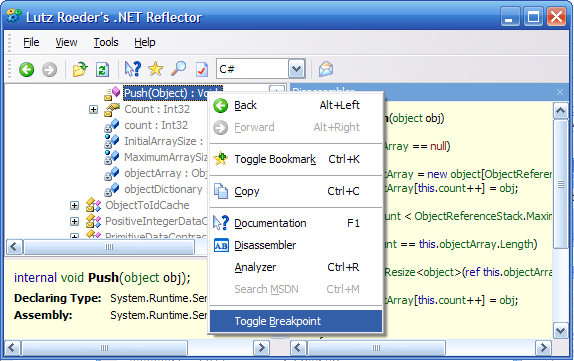
You can also set breakpoints on code from within Reflector, which is a bit friendlier than setting breakpoints from the Disassembly window. Yes, you can set breakpoints on assemblies that you don't even have the source for.

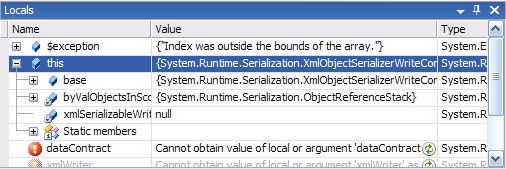
Instead of dropping into SOS mode to look at local variables and the value of this, I simply pull up the Locals debug window. The Locals window shows values from the current stack frame as you double-click each frame in the Call Stack pane.

Sometimes the Autos window will show additional relevant variables that the Locals window doesn't and vice versa, so you may want to check both if you don't find what you're looking for.

Unfortunately I haven't found a way to get Visual Studio to do the equivalent of SOS's !dumpheap or !dumpobj for browsing and searching the heap, so you'll still need to drop down to SOS/WinDbg if you want to find all in-memory instances of particular objects or if you're analyzing a dump file. Supposedly you can load WinDbg/AdPlus dumps in Visual Studio, but I haven't gotten that to work very well with dumps of managed code. If anyone knows the secret to getting Visual Studio to analyze dumps of managed code in the same level of detail as it analyzes managed processes, I'd love to find out.

For more commentary on Mike's original goal of being able to debug the .NET Framework using its actual source code, see this post by Andrew Stopford about using Rotor to debug with source, and check out the comments regarding Deblector.

Tuesday, October 24, 2006

WCF Service Dependency Injection

Whoops, I accidentally got some link love from Phil Haack, but my blog has been dormant for 8 months!  Time to start posting all those half-finished Windows Live Writer drafts!  Here goes...

Say you've implemented a WCF service that uses a business logic layer which in turn uses a data access layer.  Rather than hard-code these dependencies into your service's constructor, you would like to use dependency injection to enable unit testing of each layer using a mock object framework such as Rhino Mocks.

For our purposes we'll do constructor injection using Spring.NET, although I've also heard good things about the Castle containers, and ObjectBuilder from Microsoft patterns & practices looks promising.

So we have a few simple classes and interfaces that we'd like to automagically hook up:

    [ServiceContract]
public interface IServiceContract
{
[OperationContract]
...
}

public class ServiceLayer : IServiceContract
{
IBusinessLogic _businessLogic;
public ServiceLayer(IBusinessLogic businessLogic)
{
_businessLogic = businessLogic;
}
...
}

public interface IBusinessLogic
{
...
}

public class BusinessLogic : IBusinessLogic
{
IDataAccess _dataAccess;
public BusinessLogic(IDataAccess dataAccess)
{
_dataAccess = dataAccess;
}
...
}

public interface IDataAccess
{
...
}

public class DataAccess : IDataAccess
{
...
}

We'd like to accomplish the equivalent of the following code whenever our service is created:

    return new ServiceLayer(new BusinessLogic(new DataAccess()));

What does the Spring.NET equivalent look like?

    IApplicationContext ctx = ContextRegistry.GetContext();
return (ServiceLayer)ctx.GetObject("ServiceLayer");

How does Spring.NET know how to wire up the dependencies?  It uses reflection and config hints to determine who depends on whom:

    <configSections>
<sectionGroup name="spring">
<section name="context" type="Spring.Context.Support.ContextHandler, Spring.Core"/>
<section name="objects" type="Spring.Context.Support.DefaultSectionHandler, Spring.Core" />
</sectionGroup>
</configSections>
<spring>
<context>
<resource uri="config://spring/objects"/>
</context>
<objects xmlns="http://www.springframework.net">
<object name="DataAccess" type="NamespaceA.DataAccess, AssemblyA" />
<object name="BusinessLogic" type="NamespaceB.BusinessLogic, AssemblyB" autowire="constructor" />
<object name="ServiceLayer" type="NamespaceC.ServiceLayer, AssemblyC" autowire="constructor" />
</objects>
</spring>

That's great, but how do we get WCF to do this for us at the right place at the right time?  By using WCF's "behavior injection" functionality of course!


We'll need to implement an IInstanceProvider that allows us to serve up instances of our service each time WCF needs a new instance.

    public class DependencyInjectionInstanceProvider : IInstanceProvider
{
private Type _serviceType;

public DependencyInjectionInstanceProvider(Type serviceType)
{
_serviceType = serviceType;
}

public object GetInstance(InstanceContext instanceContext)
{
return GetInstance(instanceContext, null);
}

public object GetInstance(InstanceContext instanceContext, Message message)
{
object result = null;

IApplicationContext context = ContextRegistry.GetContext();
string[] objectNames = context.GetObjectNamesForType(_serviceType);
if (objectNames.Length != 1)
{
throw new YourOwnException(
string.Format(
CultureInfo.InvariantCulture,
"There must exist exactly one <object> definition for the {0} service in the Spring configuration",
_serviceType.Name)
);
}
return context.GetObject(objectNames[0]);
}

public void ReleaseInstance(System.ServiceModel.InstanceContext instanceContext, object instance) { }
}

Then we'll need an IServiceBehavior that plugs in our IInstanceProvider at the right place at the right time.  Remember, WCF could choose to activate our service per call, per private session, per shared session, or as a singleton.

public class DependencyInjectionServiceBehavior : IServiceBehavior
{
public void ApplyDispatchBehavior(ServiceDescription serviceDescription, ServiceHostBase serviceHostBase)
{
foreach (ChannelDispatcherBase cdb in serviceHostBase.ChannelDispatchers)
{
ChannelDispatcher cd = cdb as ChannelDispatcher;
if (cd != null)
{
foreach (EndpointDispatcher ed in cd.Endpoints)
{
ed.DispatchRuntime.InstanceProvider =
new DependencyInjectionInstanceProvider(serviceDescription.ServiceType);
}
}
}
}

public void AddBindingParameters(ServiceDescription serviceDescription, ServiceHostBase serviceHostBase,
Collection<ServiceEndpoint> endpoints, BindingParameterCollection bindingParameters) {}
public void Validate(ServiceDescription serviceDescription, ServiceHostBase serviceHostBase) {}
}


Now we want to actually use this behavior.  You could implement classes to apply this behavior using custom attributes, via config, or programmatically via a custom ServiceHost.  I chose to go the ServiceHost route.

    public class MyServiceHost : ServiceHost
{
public MyServiceHost() : base() { }
public MyServiceHost(Type serviceType, params Uri[] baseAddresses) : base(serviceType, baseAddresses) { }

protected override void OnOpening()
{
this.Description.Behaviors.Add(new DependencyInjectionServiceBehavior());
base.OnOpening();
}
}

And of course a custom ServiceHost needs a custom ServiceHostFactory if you want IIS to host it (you can use your custom ServiceHost directly when self-hosting):

    public class MyServiceHostFactory : ServiceHostFactory
{
protected override ServiceHost CreateServiceHost(Type serviceType, Uri[] baseAddresses)
{
return new MyServiceHost(serviceType, baseAddresses);
}
}

This factory can then be referenced from your .svc files:

<%@ ServiceHost
Service="NamespaceC.ServiceLayer, AssemblyC"
Factory="NamespaceD.MyServiceHostFactory, AssemblyD"
%>

Steve Maine has a great series of posts with more details on how service activation and hosting work:



Friday, February 17, 2006

FogBugz browser search integration

FogBugz 4.0 has a handy new search URL that lets you enter a bug number to go directly to a bug, or search text to find all open cases matching your query. Wouldn't it be nice to hook this into your browser's search box? Fortunately, IE7 uses A9's OpenSearch for its search providers, and Firefox uses Mycroft.

Creating the OpenSearch provider

Create an XML file with the following text:

<?xml version="1.0" encoding="UTF-8" ?>
<OpenSearchDescription xmlns="http://a9.com/-/spec/opensearch/1.1/">
<ShortName>FogBugz</ShortName>

<Description>Search FogBugz</Description>
<Url type="text/html" template="http://[your-ip-goes-here]/fogbugz/default.asp?pre=preMultiSearch&amp;pg=pgList&amp;pgBack=pgSearch&amp;search=2&amp;searchFor={searchTerms}" />
</OpenSearchDescription>


Replace [your-ip-goes-here] with the appropriate address.

Put the XML file on your web server and put the following link somewhere that's publicly accessible:

<a href="#" onClick="window.external.AddSearchProvider(&quot;http://[url-to-your-directory]/FogBugzOpenSearch.xml&quot;);">Add FogBugz search provider to IE7</a>

Replace [url-to-your-directory] with the appropriate URL.

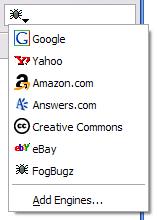
Now, when you click on the link from IE7, you'll be prompted to add a new search provider. This will make a FogBugz option available in the dropdown list of your search box:


Creating the Firefox provider

Create a file named FogBugzSearch.src in a public directory on your web server with the following text:

<search
version="7.1"
name="FogBugz"
description="Search FogBugz"
action="http://[your-ip-goes-here]/fogbugz/default.asp" searchForm="http://[your-ip-goes-here]/fogbugz/" method="GET"
>
<input name="pre=preMultiSearch&amp;pg=pgList&pgBack=pgSearch&search=2&searchFor" user=""> </search>
<browser

update="http://[url-to-your-directory]/FogBugzSearch.src"    
updateIcon="http://[url-to-your-directory]/FogBugzSearch.png"

updateCheckDays="360"

>


Fill in the blanks with the appropriate addresses and URLs.

Put the following image in the same directory:


Now to create the link. Put the following in your head element:

<script type="text/javascript">
function addEngine(name,ext,cat,type)
{
if ((typeof window.sidebar == "object") && (typeof window.sidebar.addSearchEngine == "function")) {

window.sidebar.addSearchEngine(
"http://[url-to-your-directory]"+name+".src",
"http://[url-to-your-directory]"+name+"."+ext, name, cat );

}
}
</script>


and the following link in your page:

<a href="javascript:addEngine('FogBugzSearch','png','General','0')">Add FogBugz search provider to Firefox</a>

Now, when you click on the link from Firefox, you'll be prompted to add a new search provider. This will make a FogBugz option available in the dropdown list of your search box: